Couple Halloween Costumes, Generated Without Face Swaps
Two-person edits fail when the model treats the photos as one group. Use one clear photo per person, lock both identities, and forbid a third person.
Quick answer
- Upload one photo per person, not a group photo. Two references are easier to keep separate.
- State "do not swap faces" and "do not add a third person" explicitly.
- Pick costumes with distinct silhouettes: hat and boots versus wings and halo.
- Animate the lights and fog, not a pose change. Two people moving is twice the failure surface.
The two-photo workflow
- One photo per person. Front-facing, similar lighting, similar framing. A photo of person A in sunlight and person B in a dark bar makes the relight much harder.
- Label the references. In the prompt, say "person one" and "person two" and describe each costume separately.
- Lock the identities. "Preserve each person’s recognizable face, skin tone, body proportions and identity. Do not swap faces."
- Lock the count. "Do not add a third person." This is the single most useful sentence in a couple prompt.
- Generate a still, then animate. Do not animate two people until the still is clean.
The exact cowboy and angel prompt
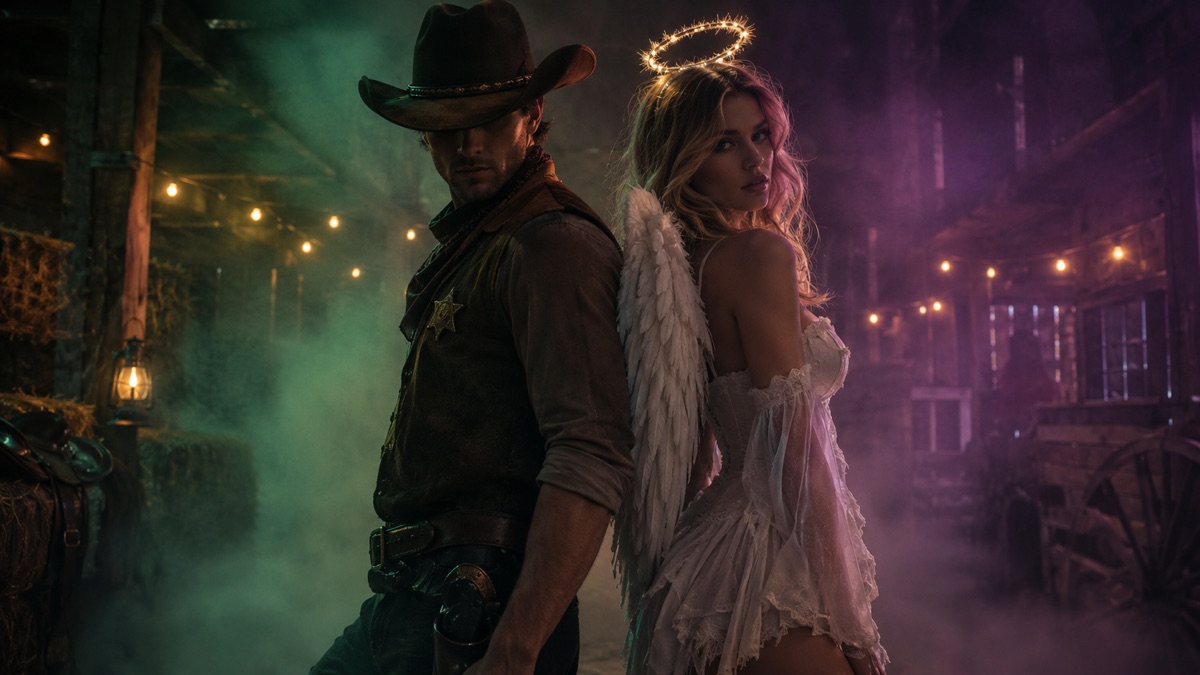
The prompt gives each person a distinct silhouette and a shared environment. The contrast between hat-and-boots and wings-and-halo is what makes the pair read as a costume, not two separate portraits.
Use the two uploaded photos as references for two different people. Preserve each person’s recognizable face, skin tone, body proportions and identity. Do not swap faces and do not add a third person. Dress person one in an original cowboy costume with a hat, vest and boots. Dress person two in an original angel costume with soft feathered wings and a simple halo. Place them back to back in a foggy barn with warm string lights and autumn hay. Use cinematic couple portrait photography, realistic fabric and feather textures, and a warm amber with deep green palette. Keep both people recognizable. Avoid altered facial identity, extra people, distorted anatomy, text or watermarks.
Image-to-video prompt
Both people hold their pose while the string lights flicker and fog drifts through the barn. A very slow push-in keeps both faces stable. No new people, no face swaps.
Other pairings that work
- Cowboy and angel. Warm amber, barn, string lights. Strong silhouette contrast.
- Sun and moon. Gold and silver costumes, a dark sky backdrop. Easy color story.
- Hunter and ghost. One practical outfit, one translucent white layer. Good for fog.
- Disco partners. Sequins, colored spotlights, a dark dance floor. Motion is easy to motivate.
- Classic horror duo. Use original costumes, not a frame from a film. Keep the silhouettes distinct.
Pick a pairing with one clear visual difference. Two dark costumes in a dark room are hard to read at thumbnail size.
What goes wrong with two people
- Face swap. The model mixed the references. Use one photo per person and label them in the prompt.
- Third person. The model invented a background figure. Add "no extra people" to the negative list.
- Merged bodies. The pose is too close. Ask for back-to-back or a clear gap between shoulders.
- One person is sharp, one is soft. The references had different quality. Use two photos with similar resolution and light.
- Costume bleed. Both outfits became the same style. Describe each costume in a separate sentence.
Posing two people without a merge
Leave a gap. Back-to-back, shoulder-to-shoulder with space, or one person slightly in front. Overlapping torsos give the model no clear boundary, and it will merge fabric, arms or faces. A visible strip of background between the two people is the simplest fix.
Match the camera height. One photo shot from eye level and one from above produces two different perspectives. The model can fake a shared viewpoint, but the result often looks like a composite. Shoot both references at the same height and distance if you can.
Give each person a job. One holds a prop, one has a hand in a pocket. Idle hands are where extra fingers appear, and props create a natural gap between bodies. A hat brim, a lantern or a bouquet also gives each silhouette a distinct edge.
Separate the backgrounds. If both references have a similar wall behind them, the model may blend the two rooms. Describe one shared location in the prompt and let the costumes carry the contrast.
Check the gap at thumbnail size. If the two silhouettes become one blob on a phone, change the pose or the costume contrast before animating. A couple portrait is read at small sizes first.
The couple video recipe
Keep both people still. Animate the string lights, the fog and a very slow push-in. If you want a head turn, do it for one person only, and keep the other person locked.
Two people moving at the same time doubles the chance of a face swap or a merged shoulder. A stable portrait with atmospheric motion is the safer clip.
Generate your couple portrait
The studio supports one upload per request. Generate each person separately if your provider cannot accept two references, then combine them in a second edit. The Cowboy & Angel preset shows the full two-reference prompt.
Halloween AI studio
Frequently asked questions
Can I generate a couple costume from two photos?
Yes, if the model accepts multiple reference images. Upload one clear photo per person and label them as person one and person two in the prompt.
Why did the faces swap?
The references were too similar or the model merged them. Use one photo per person, describe each costume separately and say "do not swap faces."
Why is there a third person?
The model invented a background figure. Add "no extra people" and use a simpler background.
Can I use a group photo?
It is possible but less predictable. The model has to choose which person to keep. Separate photos are better.
Can I animate the couple portrait?
Yes. Keep both people still and animate the lights, fog and a slow push-in. Avoid two simultaneous gestures.